
Introduction
You installed your solar street lights expecting exceptional performance, but now one of them isn’t charging and the area it’s meant to illuminate is left in the dark. If you’re dealing with a solar street light not charging, don’t panic. This is one of the most common issues users face, and in most cases, it’s fixable without professional help.
Whether it’s a solar light controller issue, a dirty panel, a loose wire, or a worn-out battery, the cause can usually be found with a few simple checks. That’s exactly what this guide is for. As part of our solar LED light repair guide, we’ll walk you through the most common reasons your system isn’t charging and show you how to fix them step by step.
We’ll also help you figure out when it’s time for a solar light battery replacement, and when it might be smarter to reach out for technical support. By the end of this post, you’ll know exactly what to check, what to test, and what to do next.
Let’s get your light back to full power.
Understanding the Charging System
Before you start wondering why is your solar street light not charging, it’s essential to understand how the system works. Once you know the key components and how they interact, you’ll be much better equipped to spot the real problem. Whether it’s a solar light controller issue, battery failure, or something else entirely.
Core Components of a Solar Street Light Charging System
A typical solar street light uses four main components to operate efficiently:
- Solar Panel (Photovoltaic Module)
Captures sunlight and converts it into DC electricity. A clean, well-positioned panel is critical. Any dirt, shade, or damage reduces energy input immediately. High-quality monocrystalline panels have conversion efficiencies of up to 22% source.
- Charge Controller
This is the brain of the system. It regulates voltage and current coming from the panel to the battery and prevents overcharging or deep discharging. If you’re experiencing a solar light controller issue, you may notice flickering lights, erratic charging, or a total system shutdown. Some advanced controllers also support MPPT (Maximum Power Point Tracking) for better efficiency in low-light conditions.
- Battery (Typically Lithium or LiFePO₄)
The battery stores energy collected during the day and powers the light at night. Over time, batteries degrade and may need to be replaced. This is where a solar light battery replacement comes into play. Lithium iron phosphate (LiFePO₄) batteries are favored for solar street lighting due to their long life (up to 2000+ charge cycles) and stable thermal characteristics source.
- LED Fixture
High-efficiency LEDs draw power from the battery and provide illumination. While not directly part of the charging circuit, a faulty LED or driver can impact overall system performance and make it appear as if charging is failing.
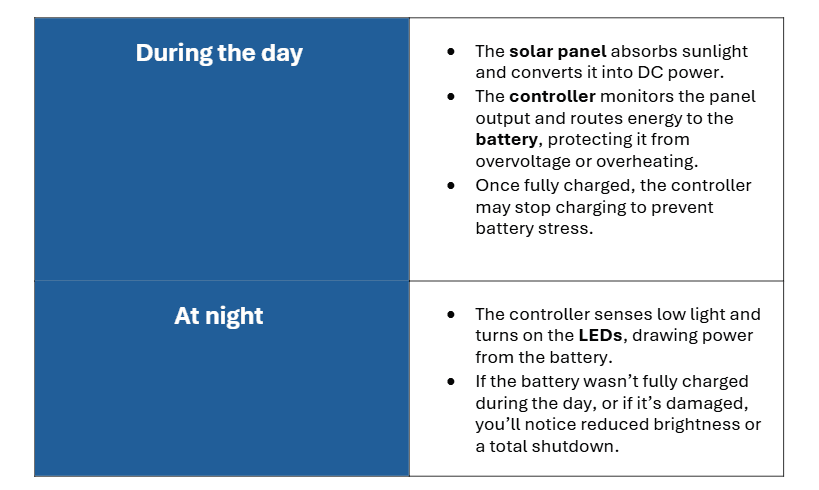
Figure 1: This table shows the charging cycle of a solar light. Understanding this flow helps you pinpoint exactly where the failure is when your solar LED light is not working properly.
Integrated vs. Split-Type Systems e
There are two types of solar street light designs:
- All-in-one (Integrated): All components—solar panel, battery, controller, LED—are housed in one compact unit. Easier to install but harder to troubleshoot internally.
- Split-type: Components are separate, often with larger solar panels and higher-capacity batteries. These systems are easier to repair and upgrade but more complex to wire.
Both types can suffer from a solar street light not charging issue, but knowing your system type will determine how and where you troubleshoot.
Check #1: Is the Solar Panel Getting Sunlight?
One of the most common reasons for a solar street light not charging is surprisingly simple: the panel isn’t receiving enough direct sunlight. Even if everything else is working perfectly (battery, controller, LEDs) your system will fail if the solar panel can’t harvest enough energy.
Here’s how to identify and fix solar exposure problems before diving into deeper electrical issues.
Shading, Obstructions, and Poor Placement
Solar panels need full, direct sunlight for 4–6 hours per day to fully charge the battery. Even partial shading from a tree branch, nearby building, or billboard can drop power generation by 30–50% source.
What to check:
- Is anything casting a shadow on the panel during the day?
- Has new construction or vegetation growth altered the light exposure?
- Are panels installed under street signs, overhangs, or power lines?
What to do:
- Relocate or re-angle the pole if possible.
- Trim trees or remove any shade-creating objects near the pole.
- For fixed installations, adjust the tilt angle to match your geographic latitude for optimal exposure.
Dirt, Dust, and Debris Build-Up
Even thin layers of dust, bird droppings, or pollen can significantly reduce efficiency. In dusty or coastal environments, panels should be cleaned monthly.
How to clean safely:
- Use a soft cloth or sponge with water—no abrasive cleaners.
- Avoid cleaning during peak sunlight hours (early morning or late evening is best).
- Don’t use high-pressure water near panel edges; it can compromise the seal.
A dirty panel is an easy fix—but it’s one of the most overlooked reasons for a solar LED light not working properly.
Seasonal Angle Adjustments
In many locations, the sun’s position changes by up to 45° between summer and winter. If your panel is installed at a fixed low angle, it may miss out on peak sun hours during part of the year.
Tip:
If your light isn’t charging during winter but works in summer, angle the panel to better face the sun during colder months. Use a solar angle calculator based on your latitude example tool.
Panel Orientation (Azimuth)
For maximum efficiency:
- In the Northern Hemisphere, panels should face true south.
- In the Southern Hemisphere, panels should face true north.
Using a compass or mobile app, make sure your panel isn’t off by more than 10–15 degrees. A misaligned panel might generate less power, leading to charging problems.
Panel Damage and Internal Faults
If everything above checks out but the issue still remains (solar street light not charging), inspect the panel itself:
- Look for cracks, delamination, or discoloration.
- Use a multimeter to test open-circuit voltage (typically 18V–22V for a 12V system).
- If no voltage is present under direct sunlight, the panel may be faulty and require replacement.
You’ll often find panel issues tied to solar light controller issues—a damaged panel can feed inconsistent voltage, causing the controller to misbehave or shut down.
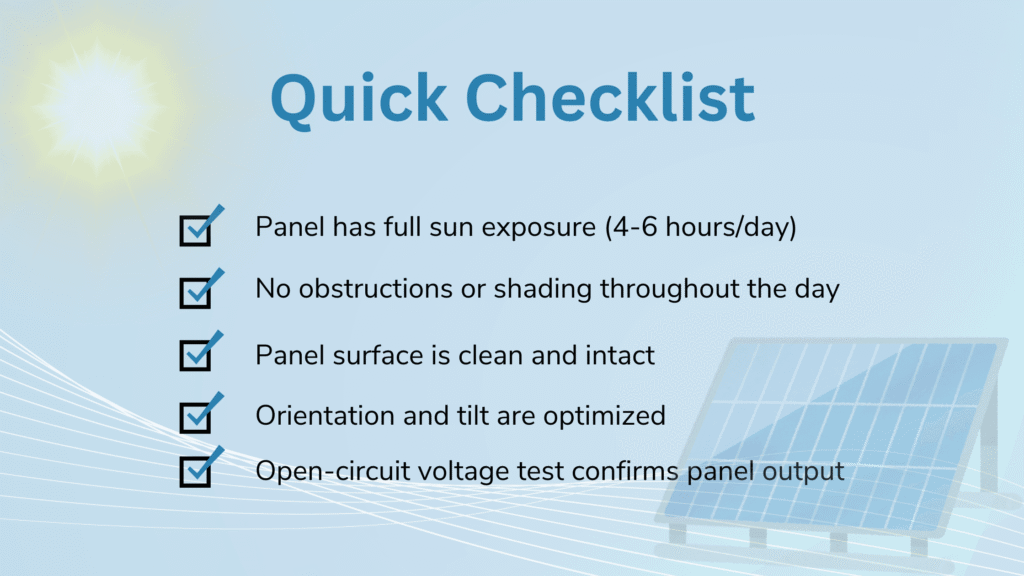
Figure 2: This figure lists the panel issues you need to look for. If these all check out and you’re still experiencing problems, the next most likely culprit is the battery. You might need a solar light battery replacement to fix the issue.
Check #2: Battery Health and Connection
If your solar street light is not charging, and you’ve already ruled out panel and sunlight issues, the next critical component to inspect is the battery. Batteries are the heart of the system, storing solar energy during the day and powering the light at night. But like all components, they degrade over time, and even minor faults can lead to major performance problems.
Battery Basics: Types and Lifespan
Most solar street lights use one of the following battery types:
- Lithium-ion (Li-ion) or Lithium Iron Phosphate (LiFePO₄): Common in all-in-one solar lights. LiFePO₄ is favored for its thermal stability, deep cycle performance, and lifespan (2000–3000 charge cycles).
- Lead-acid (Gel or AGM): Still used in larger or budget systems. They’re bulkier, require proper ventilation, and last for about 500–800 cycles.
Regardless of type, solar batteries will eventually lose capacity. If your lights used to work but now stay dim or shut off quickly after sunset, you may be due for a solar light battery replacement.
How to Test Your Solar Light Battery
You can quickly test your battery’s health using a multimeter:
- Disconnect the battery from the system.
- Set your multimeter to DC voltage.
- Measure the voltage across the terminals:
- LiFePO₄ (12.8V nominal): Healthy batteries should read between 12.8V–13.6V when fully charged.
- Lead-acid (12V nominal): Should read between 12.4V–12.9V when charged.
Warning signs of battery failure:
- Voltage below 11V = deeply discharged or damaged
- Voltage drops quickly under load
- Swelling or corrosion on terminals
- Leaking or overheating
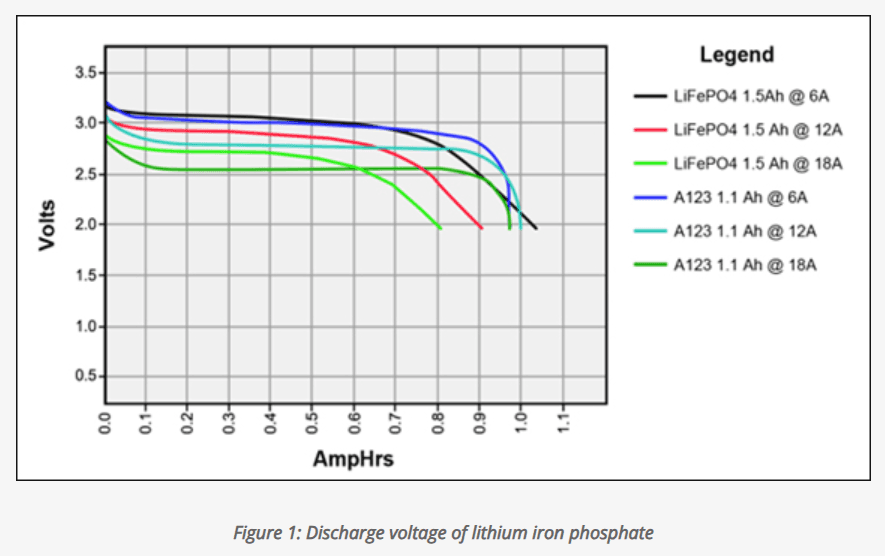
If you’re unsure about the reading, refer to this Battery University voltage chart.
Check the Battery Connections
Sometimes the issue isn’t the battery itself, but the wiring:
- Are all connectors clean, tight, and free from corrosion?
- Are terminals sealed against moisture?
- Is there damage from rodents or overheating?
A loose or oxidized connection can interrupt the charging cycle and confuse the solar light controller, triggering false low-voltage cutoffs or overcharge protection.
Make sure connections are:
- Firmly attached (not moving under slight pressure)
- Free of greenish or white corrosion
- Covered with heat shrink or waterproof terminals, especially in outdoor environments
Temperature and Environmental Impact
Batteries are sensitive to temperature extremes:
- Too cold (<0°C): Charging efficiency drops.
- Too hot (>50°C): Internal damage and swelling occur.
If your solar street lights are installed in areas with extreme weather, make sure:
- Batteries are housed in insulated, weatherproof enclosures.
- There’s thermal protection in the solar light controller to regulate charging behavior.
Poor thermal conditions are often overlooked but are a leading cause of solar LED light repair guide inquiries.
When to Replace the Battery
Here’s when to consider a solar light battery replacement:
- System is older than 2–3 years and showing shorter runtimes
- Voltage readings are consistently low, even after sunny days
- Physical signs of battery failure (leaking, swelling)
- Lights work temporarily when freshly charged but fade quickly
If your battery checks out and the solar street light is still not charging, the next likely suspect is the charge controller.
Bonus Read: Troubleshooting Common Solar Streetlight Problems [With Fixes].
Check #3: Charge Controller Problems
If your solar street light is not charging despite clean panels and a healthy battery, it’s time to investigate the solar light controller, the system’s power regulator and safety net. Even a small controller issue can disrupt the entire charging process or lead to erratic lighting behavior.
Common Symptoms of Controller Failure
A solar light controller issue can show up in different ways:
- LED status lights on the controller are off or blinking abnormally
- Lights flicker, stay on during the day, or don’t turn on at all
- No charging even when the sun is out
- Battery reads full voltage but light does not activate
In all of these cases, the controller may be misreading system inputs or suffering from internal failure.
How to Check Your Charge Controller
Here’s a step-by-step process:
- Check the LED Indicators
Most controllers have small LED lights labeled for panel, battery, and load. Look up your model’s manual to interpret the signals.
If none of the lights are on during the day, the controller may not be receiving power or may have failed.
- Measure Input and Output Voltage
- Measure voltage from the panel at the input terminals (should be ~18V for a 12V system)
- Measure voltage at the battery terminals
- If panel voltage is present but not reaching the battery, the controller is not transferring energy
- Inspect for Damage
- Look for signs of water ingress, burn marks, or corrosion
- Controllers must be housed in IP65 or better-rated enclosures for outdoor use
Try Resetting or Replacing
If the controller is glitching:
- Disconnect all inputs (panel, battery, load)
- Wait 30 seconds
- Reconnect in the order: battery → panel → load
(Always connect the battery first to avoid damaging the controller.)
Still no results? A replacement may be necessary. Basic models are inexpensive but always choose one that matches your battery type (especially for LiFePO₄) and system voltage (12V/24V). Improper controller specs can lead to poor charging or premature solar light battery replacement needs.
When to Contact Technical Support?
If you’ve worked through every major component; solar panel, battery, charge controller, and internal wiring. If your solar street light is still not charging, it might be time to reach out for professional help.
Some issues require specialized tools or diagnostics that go beyond what can be tested in the field. For example, advanced solar light controller issues can involve firmware errors or internal failures not visible on the surface. Likewise, batteries may pass a basic voltage test but fail under load due to internal resistance or thermal instability. These are situations where a trained technician can save you time, money, and repeated trial-and-error.
If you’re using DEL Solar LED Street Lights, our technical support team is ready to assist. We offer expert help to troubleshoot difficult cases, advise on proper solar light battery replacement, and guide you through system resets or part replacements. Whether you need spare parts, installation tips, or full system diagnostics, we’ve got your back.
Before contacting support, collect the following details:
- Product model and purchase date
- Symptoms (e.g. “light not turning on,” “charging light never blinks,” etc.)
- Photos of the installation (including the panel, battery, and controller)
- Voltage readings from the panel and battery (if available)
This information helps us diagnose faster and recommend the right solution.
FAQs: Solar Street Light Not Charging
Can bad weather affect my solar street light’s charging performance?
Yes, definitely. Extended periods of rain, snow, or heavy cloud cover can reduce charging efficiency, especially if the panel is already dirty or shaded. If your solar street light is not charging after multiple cloudy days, wait for 1–2 full-sun days before troubleshooting deeper. In extremely low-sun regions, consider upgrading to a larger panel or MPPT controller for better energy harvest.
How should I install my light for optimal charging?
For best results, install the panel facing true south (in the Northern Hemisphere) or true north (in the Southern Hemisphere) with a tilt angle equal to your location’s latitude. Avoid shadows from buildings, trees, and other poles. Improper installation is one of the top reasons for solar LED light repair guide calls.
Can using the wrong LED load affect charging?
Yes. An overloaded or incompatible LED fixture can draw more power than the system is designed to handle, causing battery drain or system shutdowns. Always use the LED wattage and driver type recommended by the manufacturer.
Why does my light work in summer but not in winter?
This usually points to a solar angle or panel placement problem. In winter, the sun is lower in the sky, so fixed panels set for summer may underperform. Snow buildup can also block light, especially if the panel isn’t self-cleaning or angled properly. Seasonal repositioning or adjustable mounting brackets can help reduce these issues.
Conclusion
Solar street lights are reliable, sustainable, and low-maintenance but like any technology, they can run into issues. If your solar street light is not charging, don’t assume the worst. Often, it’s something simple: a dirty panel, a weak battery, or a loose wire. This guide has walked you through all the key checkpoints, from identifying a solar light controller issue to knowing when it’s time for a solar light battery replacement.
Whether you’re a facility manager, municipal contractor, or private property owner, understanding the basics of your solar system puts you in control. But when you need backup, DEL Solar LED Lights is here to help with fast, expert support and quality components built for performance.